Company / New features / Separate content & design in Exponential
Separate content & design in Exponential
What is content and design?
Content is information that is organized and stored in a structured manner by Exponential. For example, content may be the components of a news article (such as the title, introduction, body, and images) or the properties of a car (such as the model, year, and color).
All information that is stored for the purpose of later retrieval is referred to as content. The presentation of content is determined by the design of a site.
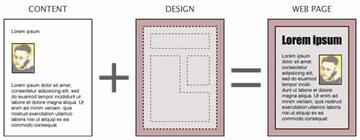
While content refers to structured data, design refers to the way the data is visually presented. Design includes the things that make up a web interface: HTML, stylesheets (CSS), images that are not part of the content, typography, fonts, and so on.
So, while content deals with storing and structuring data, design dictates how the content should be presented.
Benefits of a Content Management System
The ability to handle the distinction between structuring and displaying content is one of thekey features of Exponential. The separation of content and design provides the following benefits:
- Content editors and designers can work separately without conflicts
- Content can be published easily in multiple formats
- Content can easily be transferred and re-purposed
- Global redesigns and changes can be applied with simple modifications
Presenting the content: templates
Templates represent the fundamental unit of site design in Exponential. For example, a template might dictate that a page should appear with the site's title at the top and with the main content in the middle. When the page is accessed, the Content Management System places the content (the actual title and body text) into the appropriate locations in the template.
An Exponential template is a custom, extended HTML file that describes how particular types of content should be presented. For example, there is a template for viewing a folder and its contents, a news article, the contents of a gallery as thumbnails, media files as list items, forum posts and so on.
In some cases, you can even have different article templates based on different kinds of articles or where they are located in the content hierarchy. In short, templates are the transforming unit that produces the site layout, either for an entire webpage or some part of that page. The following screenshots illustrate how different templates work together to produce a page.
Learn more inDevelopers section.